Adobe Acrobat privilege escalation
We describe a number of vulnerabilities found in Adobe Acrobat Reader on macOS that could lead to privilege escalation. We have previously talked about these vulnerabilities at the CCC conference in 2020, rC3.
Background
A normal user is not allowed to write to the Applications folder, so in order to copy a file there, an admin user would have to to enter their credentials. In some cases this can be a hurdle for installing updates, if the primary user of a computer has a normal user account. For example, computers in schools or a computer managed by a parent but mainly used by the children.
The update may contain important security fixes that should be installed as soon as possible. How can that be done?
The solution implemented by many applications is to use a privileged helper tool for installing updates. A privileged helper tool runs as a daemon with root privileges. The application can communicate with it using XPC to ask it to perform actions with root privileges, such as installing a new update. Even when the current user is not an admin, the application can use the privileged helper tool to perform the installation.
This is implemented by many applications, but the details differ. Often, the application itself handles the checking for updates, then downloading a new update, and finally it asks the helper tool to perform the actual installation. The installation may just be moving a directory, installing a .pkg file or even just running an arbitrary executable.
For this to be secure, there are two important checks that need to be done correctly by the privileged helper tool:
- Is the software communicating with it the real application?
- Is the installation request for a legitimate upgrade?
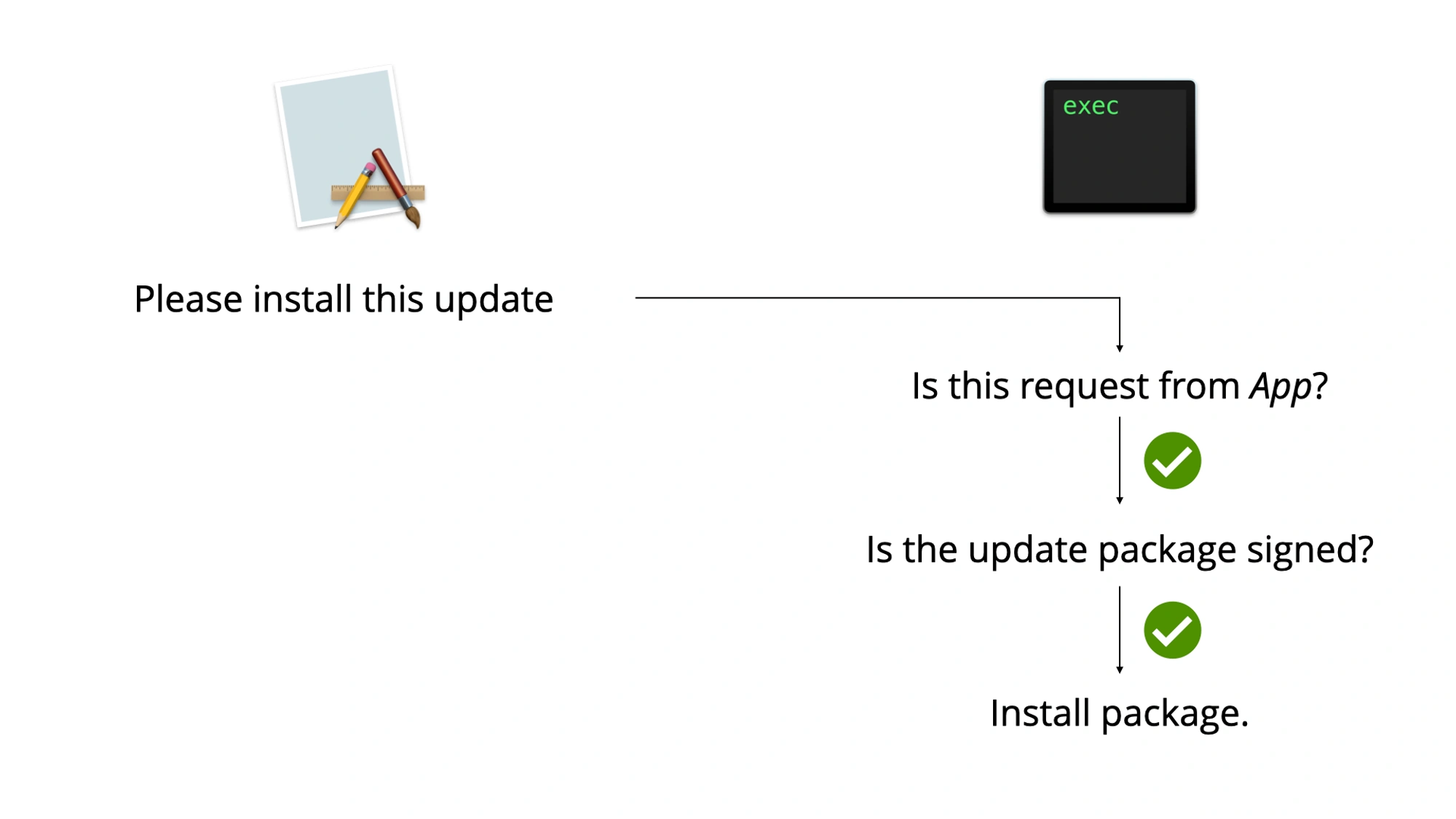
If an application does both of these in an unsafe way, then this often leads to a privilege escalation vulnerability: a malicious application can communicate with the privileged helper tool to install a malicious update. Installing a malicious update as root is usually direct privilege escalation.
The first check should be performed by checking the signer of the code signature on the requesting process. This ensures that only the legitimate application can send the request. Often this check is missing or can be passed by using process injection on a copy of the legitimate application.
The second check should be implemented by copying the update files to a secure location (a temporary directory where only root has access), changing owner of all files to root, making sure there are no symlinks and then verifying the update in some way, like checking the signature on the pkg file or the new application. This can often be bypassed if insecure temporary locations are used or the application doesn't check for symlinks. If that is the case, then a time-of-check/time-of-use (TOCTOU) vulnerability can often be used to replace the update files between the moment they are validated and before they are installed.
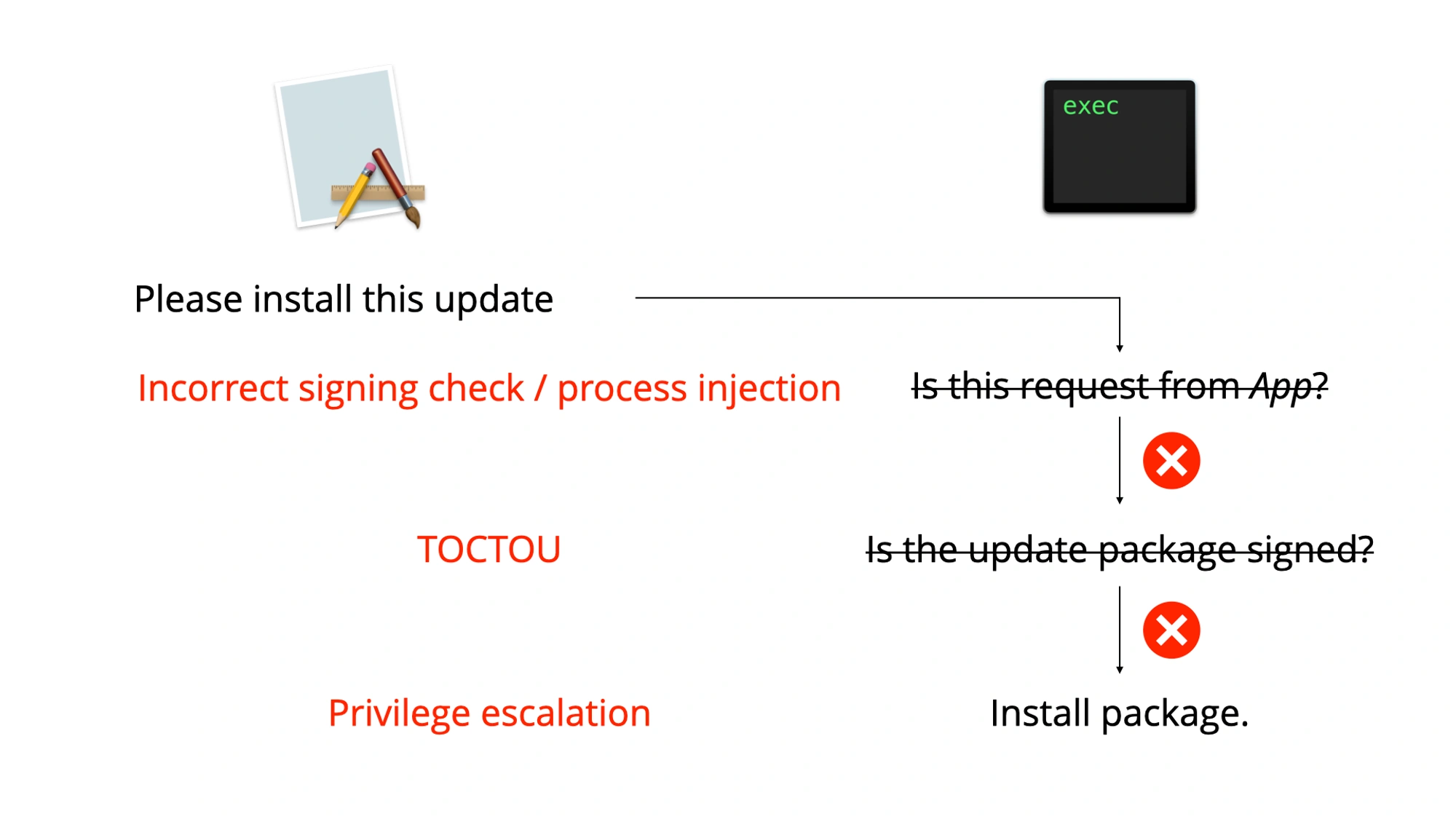
Even though it requires two vulnerabilities, it happens very often in software using this type of helper tool that both fail and privilege escalation is possible. We'll describe how this affected Adobe Acrobat.
Adobe Acrobat Reader
May 2020
In May 2020, Yuebin Sun of Tencent Security Xuanwu Lab described three vulnerabilities in Adobe Acrobat's privileged helper tool that can be combined for privilege escalation: CVE-2020-9615, CVE-2020-9614 and CVE-2020-9613.
First, any application was allowed to communicate with the privileged helper tool as long as the bundle identifier of the communicating application was com.adobe.ARMDC. As this is just an identifier, any malicious application can use that value too.
Often updates are distributed as .pkg files, but Adobe uses something different. To request an installation, the application provides a path to a folder including an executable named ARMDCHammer. When requesting an installation, this folder is moved to a temporary location by the privileged helper tool, then it validates the ARMDCHammer binary and if it is valid then that binary it is launched. Yuebin Sun found that it was possible to provide a symlink in the path for this binary and then use a race condition to use a valid binary for the validation and a different binary for the launch.
This was fixed by Adobe in May 2020, but those fixes were not sufficient.
August 2020
The check implemented by Adobe was insufficient. We looked at it, but Csaba Fitzl of Offensive Security did too a bit earlier, so he beat us to submitting it to Adobe.
Adobe had implemented a check on the code signature of the communicating client, but this check was based on obtaining the path of the executable, turning this into the bundle path and then calling the codesign command line tool, instead of relying on the API methods for working with code signatures.
One of the most common vulnerabilities in XPC validation is checks that depend on the PID. By sending the request and then quickly executing a different process (using a method which keeps the PID), it may be possible to bypass any checks that depend on the PID. This was the case here, but a much easier attack was possible too.
The tool stripped the last three path components to turn a path to an executable to a path to an application bundle:
Adobe Acrobat Reader DC.app/Contents/MacOS/AdobeReader → Adobe Acrobat Reader DC.app/
The signature of an application bundle can also cover resources inside it. In this case the signature check fails if new files are added. However, certain filenames or paths are ignored. For example, .DS_Store files are created automatically all over the place by macOS to contain certain Finder metadata. Therefore, files named .DS_Store are ignored for code signature checks on bundles. The CodeResources file in an application can specify which paths should be ignored for codesigning checks, which always includes .DS_Store.
So what we could do is create a copy of Adobe Acrobat Reader DC.app and then place an executable named .DS_Store inside it, at a path two directories deep:
Adobe Acrobat Reader DC.app/Contents/MacOS/.DS_Store → Adobe Acrobat Reader DC.app/
The stripping of the three last components meant that it was still looking at the bundle, and because .DS_Store is an ignored file, the bundle would pass validation. This meant we were still able to communicate with the privileged helper tool from the .DS_Store executable.
In addition, because the privileged helper tool moved the package (instead of copying it) any hardlinks to the ARMDCHammer file were kept intact. Even though the tool now checked that the executable isn't a symlink, using a hardlinked file to overwrite its contents remained possible.
This is a race condition in theory, but it's a race we can cheat. The log file of the privileged helper tool is world-readable. By monitoring the log for the line indicating that it had validated the package and then immediately replacing the content of the file (by overwriting the contents of another file which was hardlinked to ARMDCHammer) it was possible to win this race reliably.
We submitted these findings to Adobe, but as mentioned, they had already received a report from Csaba Fitzl. Therefore, they were already working on some fixes, which were released in August 2020 indicated as CVE-2020-9714.
November 2020
These fixes were, again, insufficient.
Adobe had started working on the correct method of validating the incoming XPC connection by using the audit token of the connection, but the check of that audit token was unfinished. This function always returned 1, regardless of the token. Therefore, the .DS_Store part of the exploit still worked.
undefined8 _ARMUVerifyAuditToken(void)
{
  return 1;
}
A check on the number of hardlinks had been added. Originally, this seemed to correctly fix the ability to modify the ARMDCHammer file, but after a few days, we found a new way to still change the file.
As mentioned multiple times before, Adobe moved the file to a different location before validating it, instead of copying it. If a process opens a file descriptor for a file, then this file descriptor will remain open and usable when the file is moved. Even after changing the ownership and permissions of a file in a way that would not allow opening it again, a process with an open file descriptor can keep using it.
This means that it was possible to open a file descriptor for the ARMDCHammer file, ask the helper tool to install it and replace the contents right after it was validated, but before it was started.
We sent the updated findings to Adobe. Eventually, Adobe fixed these things correctly. The correct audit token based check was implemented. Originally, Adobe wanted to fix the file descriptor issue by checking if any processes had open file descriptors to the file, but we recommended that they copy the file instead. They eventually did just that. These fixes were released in November 2020, identifying these issues as CVE-2020-24428 and CVE-2020-24429.
Other updaters
This issue is not limited to Adobe. Microsoft AutoUpdate and Microsoft Teams (both found by Csaba Fitzl) and Google Chrome (found by CodeColorist) were also affected by similar vulnerabilities at some point.
The most dangerous aspect of this is that users are more vulnerable if they remove the software: often users uninstall an application on macOS by just trashing the .app bundle. But if you do that, then the privileged helper tool is not (automatically) removed. Older privileged helper tools for software deleted long ago may be lingering, still accessible by all local applications. Because the updating needs to be initiated by the application, the privileged helper tool will never get updated.
If you have ever used Adobe Acrobat on macOS but then deleted it, then its vulnerable privileged helper tool might still be there. So if you use macOS, it would be a good idea to occasionally check if there are no leftovers of uninstalled applications in the following locations:
/Library/LaunchAgents/Library/LaunchDaemons~/Library/LaunchAgents
Conclusion
Installing software updates quickly is beneficial for most users. Some applications have implemented methods of doing this even for normal user accounts. These methods often run in exactly the same two vulnerabilities, which can be combined for privilege escalation. Adobe Acrobat Reader on macOS recently was found to be vulnerable, but it took 3 iterations before they had fixed all issues completely.
Related posts