CoronaCheck App TLS certificate vulnerabilities
Background
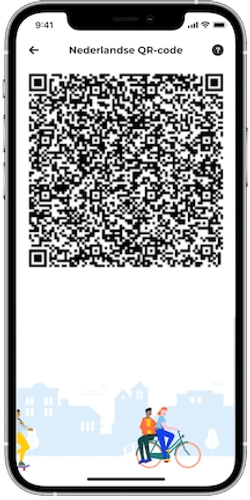
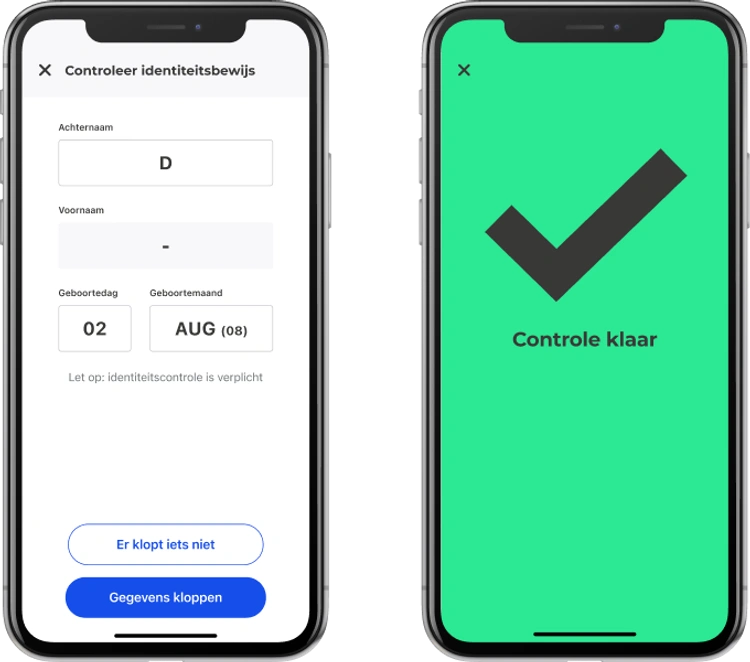
The CoronaCheck app can be used to generate a QR code proving that the user has received either a COVID-19 vaccination, has recently received a negative test result or has recovered from COVID-19. A separate app, the CoronaCheck Verifier can be used to check these QR codes. These apps are used to give access to certain locations or events, which is known in The Netherlands as "Testen voor Toegang". They may also be required for traveling to specific countries. The app used to generate the QR code is refered to in the codebase as the Holder app to distinguish it from the Verifier app. The source code of these apps is available on Github, although active development takes place in a separate non-public repository. At certain intervals, the public source code is updated from the private repository.
The Holder app:
The Verifier app:
The verification of the QR codes uses two different methods, depending on whether the code is for use in The Netherlands or internationally. The cryptographic process is very different for each. We spent a bit of time looking at these two processes, but found no (obvious) vulnerabilities.
Then we looked at the verification of the connections set up by the two apps. Part of the configuration of the app needs to be downloaded from a server hosted by the Ministerie van Volksgezondheid, Welzijn en Sport (VWS). This is because test results are retrieved by the app directly from the test provider. This means that the Holder app needs to know which test providers are used right now, how to connect to them and the Verifier app needs to know what keys to use to verify the signatures for that test provider. The privacy aspects of this design are quite good: the test provider only knows the user retrieved the result, but not where they are using it. VWS doesn't know who has done a test or their results and the Verifier only sees the limited personal information in the QR which is needed to check the identity of the holder. The downside of this is that blocking a specific person's QR code is difficult.
Strict requirements were formulated for the security of these connections in the design. See here (in Dutch). This includes the use of certificate pinning to check that the certificates are issued a small set of Certificate Authorities (CAs). In addition to the use of TLS, all responses from the APIs must be signed using a signature. This uses the PKCS#7 Cryptographic Message Syntax (CMS) format.
Many of the checks on certificates that were added in the iOS app contained subtle mistakes. Combined, only one implicit check on the certificate (performed by App Transport Security) was still effective. This meant that there was no certificate pinning at all and any malicious CA could generate a certificate capable of intercepting the connections between the app and VWS or a test provider.
Certificate check issues
An iOS app that wants to handle the checking of TLS certificates itself can do so by implementing the delegate method urlSession(_:didReceive:completionHandler:). Whenever a new connection is created, this method is called allowing the app to perform its own checks. It can respond in three different ways: continue with the usual validation (performDefaultHandling), accept the certificate (useCredential) or reject the certificate (cancelAuthenticationChallenge). This function can also be called for other authentication challenges, such as HTTP basic authentication, so it is common to check that the type is NSURLAuthenticationMethodServerTrust first.
This was implemented as follows in SecurityStrategy.swift lines 203 to 262:
func checkSSL() {

    guard challenge.protectionSpace.authenticationMethod == NSURLAuthenticationMethodServerTrust,
          let serverTrust = challenge.protectionSpace.serverTrust else {

        logDebug("No security strategy")
        completionHandler(.performDefaultHandling, nil)
        return
    }

    let policies = [SecPolicyCreateSSL(true, challenge.protectionSpace.host as CFString)]
    SecTrustSetPolicies(serverTrust, policies as CFTypeRef)
    let certificateCount = SecTrustGetCertificateCount(serverTrust)

    var foundValidCertificate = false
    var foundValidCommonNameEndsWithTrustedName = false
    var foundValidFullyQualifiedDomainName = false

    for index in 0 ..< certificateCount {

        if let serverCertificate = SecTrustGetCertificateAtIndex(serverTrust, index) {
            let serverCert = Certificate(certificate: serverCertificate)

            if let name = serverCert.commonName {
                if name.lowercased() == challenge.protectionSpace.host.lowercased() {
                    foundValidFullyQualifiedDomainName = true
                    logVerbose("Host matched CN \(name)")
                }
                for trustedName in trustedNames {
                    if name.lowercased().hasSuffix(trustedName.lowercased()) {
                        foundValidCommonNameEndsWithTrustedName = true
                        logVerbose("Found a valid name \(name)")
                    }
                }
            }
            if let san = openssl.getSubjectAlternativeName(serverCert.data), !foundValidFullyQualifiedDomainName {
                if compareSan(san, name: challenge.protectionSpace.host.lowercased()) {
                    foundValidFullyQualifiedDomainName = true
                    logVerbose("Host matched SAN \(san)")
                }
            }
            for trustedCertificate in trustedCertificates {

                if openssl.compare(serverCert.data, withTrustedCertificate: trustedCertificate) {
                    logVerbose("Found a match with a trusted Certificate")
                    foundValidCertificate = true
                }
            }
        }
    }

    if foundValidCertificate && foundValidCommonNameEndsWithTrustedName && foundValidFullyQualifiedDomainName {
        // all good
        logVerbose("Certificate signature is good for \(challenge.protectionSpace.host)")
        completionHandler(.useCredential, URLCredential(trust: serverTrust))
    } else {
        logError("Invalid server trust")
        completionHandler(.cancelAuthenticationChallenge, nil)
    }
}
If an app wants to implement additional verification checks, then it is common to start with performing the platform's own certificate validation. This also means that the certificate chain is resolved. The certificates received from the server may be incomplete or contain additional certificates, by applying the platform verification a chain is constructed ending in a trusted root (if possible). An app that uses a private root could also do this, but while adding the root as the only trust anchor.
This leads to the first issue with the handling of certificate validation in the CoronaCheck app: instead of giving the "continue with the usual validation" result, the app would accept the certificate if its own checks passed (line 257). This meant that the checks are not additions to the verification, but replace it completely. The app does implicitly perform the platform verification to obtain the correct chain (line 215), but the result code for the validation was not checked, so an untrusted certificate was not rejected here.
The app performs 3 additional checks on the certificate:
- It is issued by one of a list of root certificates (line 246).
- It contains a Subject Alternative Name containing a specific domain (line 238).
- It contains a Common Name containing a specific domain (lines 227 and 232).
For checking the root certificate the resolved chain is used and each certificate is compared to a list of certificates hard-coded in the app. This set of roots depends on what type of connection it is. Connections to the test providers are a bit more lenient, while the connection to the VWS servers itself needs to be issued by a specific root.
This check had a critical issue: the comparison was not based on unforgeable data. Comparing certificates properly could be done by comparing them byte-by-byte. Certificates are not very large, this comparison would be fast enough. Another option would be to generate a hash of both certificates and compare those. This could speed up repeated checks for the same certificate. The implemented comparison of the root certificate was based on two checks: comparing the serial number and comparing the "authority key information" extension fields. For trusted certificates, the serial number must be randomly generated by the CA. The authority key information field is usually a hash of the certificate's issuer's key, but this can be any data. It is trivial to generate a self-signed certificate with the same serial number and authority key information field as an existing certificate. Combine this with the previous item and it is possible to generate a new, self-signed certificate that is accepted by the TLS verification of the app.
- (BOOL)compare:(NSData *)certificateData withTrustedCertificate:(NSData *)trustedCertificateData {

	BOOL subjectKeyMatches = [self compareSubjectKeyIdentifier:certificateData with:trustedCertificateData];
	BOOL serialNumbersMatches = [self compareSerialNumber:certificateData with:trustedCertificateData];
	return subjectKeyMatches && serialNumbersMatches;
}

- (BOOL)compareSubjectKeyIdentifier:(NSData *)certificateData with:(NSData *)trustedCertificateData {

	const ASN1_OCTET_STRING *trustedCertificateSubjectKeyIdentifier = NULL;
	const ASN1_OCTET_STRING *certificateSubjectKeyIdentifier = NULL;
	BIO *certificateBlob = NULL;
	X509 *certificate = NULL;
	BIO *trustedCertificateBlob = NULL;
	X509 *trustedCertificate = NULL;
	BOOL isMatch = NO;

	if (NULL  == (certificateBlob = BIO_new_mem_buf(certificateData.bytes, (int)certificateData.length)))
		EXITOUT("Cannot allocate certificateBlob");

	if (NULL == (certificate = PEM_read_bio_X509(certificateBlob, NULL, 0, NULL)))
		EXITOUT("Cannot parse certificateData");

	if (NULL  == (trustedCertificateBlob = BIO_new_mem_buf(trustedCertificateData.bytes, (int)trustedCertificateData.length)))
		EXITOUT("Cannot allocate trustedCertificateBlob");

	if (NULL == (trustedCertificate = PEM_read_bio_X509(trustedCertificateBlob, NULL, 0, NULL)))
		EXITOUT("Cannot parse trustedCertificate");

	if (NULL == (trustedCertificateSubjectKeyIdentifier = X509_get0_subject_key_id(trustedCertificate)))
		EXITOUT("Cannot extract trustedCertificateSubjectKeyIdentifier");

	if (NULL == (certificateSubjectKeyIdentifier = X509_get0_subject_key_id(certificate)))
		EXITOUT("Cannot extract certificateSubjectKeyIdentifier");

	isMatch = ASN1_OCTET_STRING_cmp(trustedCertificateSubjectKeyIdentifier, certificateSubjectKeyIdentifier) == 0;

errit:
	BIO_free(certificateBlob);
	BIO_free(trustedCertificateBlob);
	X509_free(certificate);
	X509_free(trustedCertificate);

	return isMatch;
}

- (BOOL)compareSerialNumber:(NSData *)certificateData with:(NSData *)trustedCertificateData {

	BIO *certificateBlob = NULL;
	X509 *certificate = NULL;
	BIO *trustedCertificateBlob = NULL;
	X509 *trustedCertificate = NULL;
	ASN1_INTEGER *certificateSerial = NULL;
	ASN1_INTEGER *trustedCertificateSerial = NULL;
	BOOL isMatch = NO;

	if (NULL  == (certificateBlob = BIO_new_mem_buf(certificateData.bytes, (int)certificateData.length)))
		EXITOUT("Cannot allocate certificateBlob");

	if (NULL == (certificate = PEM_read_bio_X509(certificateBlob, NULL, 0, NULL)))
		EXITOUT("Cannot parse certificate");

	if (NULL  == (trustedCertificateBlob = BIO_new_mem_buf(trustedCertificateData.bytes, (int)trustedCertificateData.length)))
		EXITOUT("Cannot allocate trustedCertificateBlob");

	if (NULL == (trustedCertificate = PEM_read_bio_X509(trustedCertificateBlob, NULL, 0, NULL)))
		EXITOUT("Cannot parse trustedCertificate");

	if (NULL == (certificateSerial = X509_get_serialNumber(certificate)))
		EXITOUT("Cannot parse certificateSerial");

	if (NULL == (trustedCertificateSerial = X509_get_serialNumber(trustedCertificate)))
		EXITOUT("Cannot parse trustedCertificateSerial");

	isMatch = ASN1_INTEGER_cmp(certificateSerial, trustedCertificateSerial) == 0;

errit:
	if (certificateBlob) BIO_free(certificateBlob);
	if (trustedCertificateBlob) BIO_free(trustedCertificateBlob);
	if (certificate) X509_free(certificate);
	if (trustedCertificate) X509_free(trustedCertificate);

	return isMatch;
}
This combination of issues may sound like TLS validation was completely broken, but luckily there was a safety net. In iOS 9, Apple introduced a mechanism called App Transport Security (ATS) to enforce certificate validation on connections. This is used to enforce the use of secure and trusted HTTPS connections. If an app wants to use an insecure connection (either plain HTTP or HTTPS with certificates not issued by a trusted root), it needs to specifically opt-in to that in its Info.plist file. This creates something of a safety net, making it harder to accidentally disable TLS certificate validation due to programming mistakes.
ATS was enabled for the CoronaCheck apps without any exceptions. This meant that our untrusted certificate, even though accepted by the app itself, was rejected by ATS. This meant we couldn't completely bypass the certificate validation. This could however still be exploitable in these scenarios:
- A future update for the app could add an ATS exception or an update to iOS might change the ATS rules. Adding an ATS exception is not as unrealistic as it may sound: the app contains a trusted root that is not included in the iOS trust store ("Staat der Nederlanden Private Root CA - G1"). To actually use that root would require an ATS exception.
- A malicious CA could issue a certificate using the serial number and authority key information of one of the trusted certificates. This certificate would be accepted by ATS and pass all checks. A reliable CA would not issue such a certificate, but it does mean that the certificate pinning that was part of the requirements was not effective.
Other issues
We found a number of other issues in the verification of certificates. These are of lower impact.
Subject Alternative Names
In the past, the Common Name field was used to indicate for which domain a certificate was for. This was inflexible, because it meant each certificate was only valid for one domain. The Subject Alternative Name (SAN) extension was added to make it possible to add more domain names (or other types of names) to certificates. To correctly verify if a certificate is valid for a domain, the SAN extension has to be checked.
Obtaining the SANs from a certificates was implemented by using OpenSSL to generate a human-readable representation of the SAN extension and then parsing that. This did not take into account the possibility of other name types than a domain name, such as an email addresses in a certificate used for S/MIME. The parsing could be confused using specifically formatted email addresses to make it match any domain name.
SecurityStrategy.swift lines 114 to 127:
func compareSan(_ san: String, name: String) -> Bool {

    let sanNames = san.split(separator: ",")
    for sanName in sanNames {
        // SanName can be like DNS: *.domain.nl
        let pattern = String(sanName)
            .replacingOccurrences(of: "DNS:", with: "", options: .caseInsensitive)
            .trimmingCharacters(in: .whitespacesAndNewlines)
        if wildcardMatch(name, pattern: pattern) {
            return true
        }
    }
    return false
}
For example, an S/MIME certificate containing the email address "a,*,b"@example.com (which is a valid email address) would result in a wildcard domain (*) that matches all hosts.
CMS signatures
The domain name check for the certificate used to generate the CMS signature of the response did not compare the full domain name, instead it checked that a specific string occurred in the domain (coronacheck.nl) and that it ends with a specific string (.nl). This means that an attacker with a certificate for coronacheck.nl.example.nl could also CMS sign API responses.
- (BOOL)validateCommonNameForCertificate:(X509 *)certificate
                         requiredContent:(NSString *)requiredContent
                          requiredSuffix:(NSString *)requiredSuffix {

    // Get subject from certificate
    X509_NAME *certificateSubjectName = X509_get_subject_name(certificate);

    // Get Common Name from certificate subject
    char certificateCommonName[256];
    X509_NAME_get_text_by_NID(certificateSubjectName, NID_commonName, certificateCommonName, 256);
    NSString *cnString = [NSString stringWithUTF8String:certificateCommonName];

    // Compare Common Name to required content and required suffix
    BOOL containsRequiredContent = [cnString rangeOfString:requiredContent options:NSCaseInsensitiveSearch].location != NSNotFound;
    BOOL hasCorrectSuffix = [cnString hasSuffix:requiredSuffix];

    certificateSubjectName = NULL;

    return hasCorrectSuffix && containsRequiredContent;
}
The only issue we found on the Android implementation is similar: the check for the CMS signature used a regex to check the name of the signing certificate. This regex was not bound on the right, making also possible to bypass it using coronacheck.nl.example.com.
SignatureValidator.kt lines 94 to 96:
fun cnMatching(substring: String): Builder {
    return cnMatching(Regex(Regex.escape(substring)))
}
SignatureValidator.kt line 142 to 149:
if (cnMatchingRegex != null) {
    if (!JcaX509CertificateHolder(signingCertificate).subject.getRDNs(BCStyle.CN).any {
            val cn = IETFUtils.valueToString(it.first.value)
            cnMatchingRegex.containsMatchIn(cn)
        }) {
        throw SignatureValidationException("Signing certificate does not match expected CN")
    }
}
Because these certificates had to be issued by PKI-Overheid (a CA run by the Dutch government) certificate, it might not have been easy to obtain a certificate with such a domain name.
Race condition
We also found a race condition in the application of the certificate validation rules. As we mentioned, the rules the app applied for certificate validation were more strict for VWS connections than for connections to test providers, and even for connections to VWS there were different levels of strictness. However, if two requests were performed quickly after another, the first request could be validated based on the verification rules specified for the second request. In practice, the least strict verification rules still require a valid certificate, so this can not be used to intercept connections either. However, it was already triggering in normal use, as the app was initiating two requests with different validation rules immediately after starting.
Reporting
We reported these vulnerabilities to the email address on the "Kwetsbaarheid melden" (Report a vulnerability) page on June 30th, 2021. This email bounced because the address did not exist. We had to reach out through other channels to find a working address. We received an acknowledgement that the message was received, but no further updates. The vulnerabilities were fixed quietly, without letting us know that they were fixed.
In October we decided to look at the code on GitHub to check if all issues were resolved correctly. While most issues were fixed, one was not fixed properly. We sent another email detailing this issue. This was again fixed without informing us.
Developers are of course not required to keep us in the loop of the if we report a vulnerability, but this does show that if they had, we could have caught the incorrect fix much earlier.
Recommendation
TLS certificate validation is a complex process. This case demonstrates that adding more checks is not always better, because they might interfere with the normal platform certificate validation. We recommend changing the certificate validation process only if absolutely necessary. Any extra checks should have a clear security goal. Checks such as "the domain must contain the string ..." (instead of "must end with ...") have no security benefit and should be avoided.
Certificate pinning not only has implementation challenges, but also operational challenges. If a certificate renewal has not been properly planned, then it may leave an app unable to connect. This is why we usually recommend pinning only for applications handling very sensitive user data. Other checks can be implemented to address the risk of a malicious or compromised CA with much less chance of problems, for example checking the revocation and Certificate Transparency status of a certificate.
Conclusion
We found and reported a number of issues in the verification of TLS certificates used for the connections of the Dutch CoronaCheck apps. These vulnerabilities could have been combined to bypass certificate pinning in the app. In most cases, this could only be abused by a compromised or malicious CA or if a specific CA could be used to issue a certificate for a certain domain. These vulnerabilities have since then been fixed.